
Tuning CloudNativePG without the guesswork
Using Agentic AI for Kubernetes PostgreSQL optimization.

Running PostgreSQL on Kubernetes isn't new anymore. CloudNativePG makes it genuinely production-ready, with automatic failover, streaming replication, and declarative configuration that actually works.
But here's the thing: nobody talks about tuning these clusters.
Most PostgreSQL tuning guides assume you're SSH'd into a server, editing postgresql.conf by hand, and hoping for the best. They tell you to set shared_buffers to 25% of RAM — but is that the node's RAM or the pod's memory limit? They tell you to tune work_mem based on concurrent connections, ignoring the fact that your connection pooler and pod autoscaler shift those numbers in real-time.
None of that applies when your database runs in a pod with resource limits, auto-scaling replicas, and a high-availability setup where the primary can switch at any moment.
So we built support for CloudNativePG into DBtune and ran an experiment: Can you actually tune a CNPG cluster automatically?
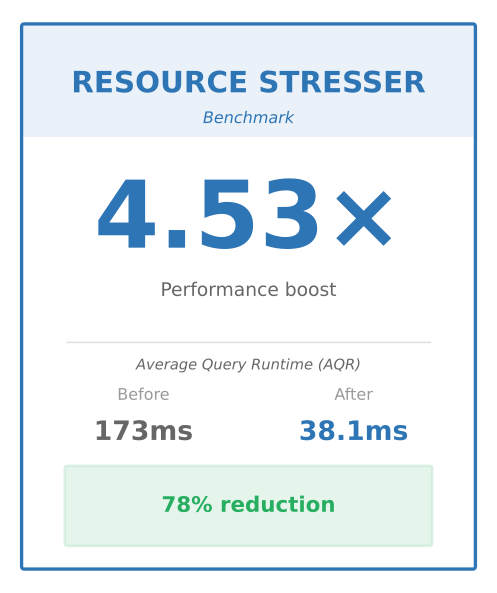
The result: A 4.5x performance improvement — from 173ms to 38.1ms average query runtime, with zero downtime.
The DBtune agent handles all the Kubernetes complexity—primary detection, RBAC permissions, failover awareness, and parameter validation—while we watch the optimization happen.
This blog post walks through how it works.
The Problem: Kubernetes changes everything about database tuning
If you have tuned PostgreSQL on bare metal or VMs, you know the drill: edit postgresql.conf, reload or restart the server, run your workload. Simple, right?
But when PostgreSQL runs on Kubernetes with CloudNativePG (CNPG), everything changes:
- Configuration is declarative: You patch a YAML manifest, not a config file.
- High availability is built-in: Multiple instances with automatic failover.
- Failover management: The primary can switch during tuning.
- Resource limits matter: Kubernetes enforces CPU and memory limits that affect PostgreSQL performance and stability.
- Access control is different: Interacting with the database requires understanding Kubernetes RBAC, not just PostgreSQL roles.
Traditional tuning tools aren’t designed for this world. They expect SSH access, direct file editing, and predictable server identities. In Kubernetes, none of that applies.
We wanted to see if DBtune can handle this complexity. Can it tune a highly available CNPG cluster without manual intervention? Does it adjust to primary failovers? Does it deliver meaningful performance improvements?
Getting started: The "two requirement"
If you already have a CloudNativePG cluster running, you're almost ready to use DBtune. To analyze your actual workload and make intelligent tuning decisions, DBtune leverages the pg_stat_statements extension as its primary source for query performance data.
1. PostgreSQL: pg_stat_statements extension
This extension is the "black box recorder" for PostgreSQL. It tracks execution statistics for all SQL statements. DBtune uses this data to understand your query pattern and identify exactly which parameters will give you the biggest performance boost.
Step 1: Check if it's already enabled — Run this query in your database:
SELECT * FROM pg_extension WHERE extname = 'pg_stat_statements';
Step 2: Enable it via the CNPG cluster spec — If it's not enabled, you don't need to worry about manually editing configuration files or managing libraries. CloudNativePG handles this automatically. Just add these parameters under spec.postgresql.parameters:
apiVersion: postgresql.cnpg.io/v1
kind: Cluster
metadata:
  name: dbtune-demo-cluster
spec:
  # ...
  postgresql:
    parameters:
      pg_stat_statements.max: "10000"
      pg_stat_statements.track: "all"
What does the Operator do for you? The moment you apply this change, the CNPG operator takes over. It recognizes that these parameters require the pg_stat_statements library and will:
-
Automatically add
pg_stat_statementstoshared_preload_libraries. -
Manage the rollout: It performs a rolling update of your pods to load the library without dropping your cluster offline.
-
Bootstrap the extension: It runs the
CREATE EXTENSIONcommand across your databases so the metrics start flowing immediately.Pro tip: Set
trackto 'all'. We recommend settingpg_stat_statements.track = 'all'. While the PostgreSQL default is'top'(which only tracks top-level queries), setting it to'all'captures queries executed inside functions and nested statements. This gives DBtune a more complete picture of your database activity.
Step 3: Apply the changes
kubectl apply -f your-cluster.yaml
After the rolling update completes, pg_stat_statements will be fully enabled and ready to use across your cluster.
2. Kubernetes: metrics-server
DBtune needs to monitor container-level resource usage (CPU, memory) to understand the gap between what PostgreSQL thinks it has access to and what Kubernetes is actually enforcing via cgroups.
Check if it's already installed:
kubectl get deployment metrics-server -n kube-system
If you see the deployment, you're good to go.
Most managed Kubernetes environments (EKS, GKE, AKS) have metrics-server pre-installed. If you are running on Kind, Minikube, or a self-managed cluster, you will need to install it:
# Install metrics-server
kubectl apply -f https://github.com/kubernetes-sigs/metrics-server/releases/latest/download/components.yaml
# For Kind/Minikube only: Patch to disable TLS verification
kubectl patch deployment metrics-server -n kube-system --type='json' -p='[
    {"op": "add", "path": "/spec/template/spec/containers/0/args/-", "value": "--kubelet-insecure-tls"},
    {"op": "add", "path": "/spec/template/spec/containers/0/args/-", "value": "--kubelet-preferred-address-types=InternalIP"}
  ]'
# Wait for it to be ready
kubectl wait --for=condition=available --timeout=120s deployment/metrics-server -n kube-system

# Verify it's working:
kubectl top pods -n database
You should see CPU and memory usage for your pods.
Why both?
| Requirement | What it provides | Why DBtune needs it |
|---|---|---|
pg_stat_statements | SQL query execution stats | Identifies which queries are slow and which parameters to tune |
metrics-server | Container CPU/memory metrics | Detects resource pressure and prevents OOMKills when tuning memory parameters |
Deploying the DBtune agent
The DBtune agent runs as a standard Kubernetes Deployment. Unlike traditional agents that require a static VM, this agent is designed for the dynamic nature of Kubernetes. It uses specific role-based access control (RBAC) permissions to securely communicate with the CNPG operator and the Kubernetes API.
Minimum required permissions
| Permission | Resource | Why needed |
|---|---|---|
get, list, watch | pods | Detects which pod is currently the Primary instance. |
get, list, patch | clusters.postgresql.cnpg.io | Read the current CNPG cluster configuration and apply tuning parameters. |
get, list | pods.metrics.k8s.io | Monitor real-time CPU and memory usage to ensure parameters stay within pod resource limits. |
The Deployment manifest
Create a file named dbtune-agent.yaml. You will need to replace the {PLACEHOLDERS} (like {YOUR_NAMESPACE}, {CLUSTER_NAME}, etc.) with your actual environment values.
Deploy and verify
Apply the manifest:
kubectl apply -f dbtune-agent.yaml
Verify the logs to ensure a successful connection:
kubectl logs -f -n {YOUR_NAMESPACE} -l app=dbtune-agent
What the agent is actually doing
Once deployed, the agent acts as an automated DBA, handling the "heavy lifting" of both observability and configuration management.
1. Deep observability (PostgreSQL & K8s)
The agent continuously collects and transmits performance metrics to the DBtune backend:
- Performance metrics: Latency as average query runtime (AQR), throughput as transactions per second (TPS), and query patterns via
pg_stat_statements. - Resource awareness: Real-time CPU and memory consumption tracked against pod limits.
- Health & storage: Cache hit ratios, WAL generation rates, and disk I/O.
2. CNPG-specific intelligence
Traditional tuning tools break when a failover happens. The DBtune agent is built to understand the operator's architecture and work within its constraints.
Intelligent parameter filtering: CloudNativePG manages 40+ PostgreSQL parameters internally to maintain replication, archiving, and high availability. These are called "fixed parameters" and cannot be modified without breaking your cluster.
DBtune automatically filters out all CNPG-managed parameters before applying any configuration changes. This prevents scenarios where a tuning recommendation could:
- Break replication by modifying
primary_conninfo - Disable archiving by changing
archive_command - Remove critical extensions like
pg_stat_statementsfromshared_preload_libraries - Corrupt SSL/TLS configurations
The agent cross-references every backend recommendation against CNPG's fixed parameter list, excludes any matches, and logs the exclusion for observability.
Failover handling: It automatically detects when a primary instance changes and reconnects to the new primary without manual intervention.
Guardrails: It prevents configuration changes that could exceed Kubernetes resource limits, protecting your cluster from out of memory (OOM) crashes.
3. The tuning & verification loop
This is where the magic happens. The agent doesn't just "suggest" changes; it manages the lifecycle of the optimization:
- Collect: Aggregates performance data over a ~3-hour monitoring window.
- Apply: Once a recommendation is approved, the agent patches the CNPG cluster manifest automatically.
- Verify: The agent doesn't just "fire and forget". It waits for the PostgreSQL ready status, ensures pods are healthy, and verifies the entire cluster state before confirming the tuning was successful.
Our experiment: Testing DBtune with CNPG
To validate the integration, we didn't just run a "hello world" test. We built a complete, high-availability environment to see how DBtune handles real-world resource pressure and unexpected failures.
The infrastructure
We used Kind (Kubernetes in Docker) to simulate a multi-node production cluster:
-
Kubernetes cluster: 3 Kind nodes (1 control-plane, 2 workers) with
metrics-serverenabled. -
Database: PostgreSQL 18 managed by CloudNativePG v1.28.0.
-
High availability: 3 instances (1 Primary + 2 Replicas) using streaming replication and automated replication slots.
-
Resources: We gave the pods significant room to breathe with 8GB RAM and 4 CPUs to see how tuning would utilize these limits.
Note: While we use v1.28.0 for this test, DBtune is fully tested across the last three major versions of the CloudNativePG operator.
Benchmarking with BenchBase
For the workload, we used BenchBase running the ResourceStresser benchmark. This is a synthetic stress test designed to create contention across CPU, disk I/O, and locking mechanisms.
We started with a 2-hour warm-up period using default PostgreSQL parameters to establish a performance baseline. DBtune then monitored the workload and applied tuning recommendations over the next ~3-hours (30 optimization iterations).
Finally, we ran a 30-minute verification test to confirm the performance gains remained consistent and stable.
How DBtune handles kubernetes and failovers
The most critical question for any DBA is: "What happens if the primary fails over during a tuning session?" In a traditional single-server setup, a primary failure means immediate downtime. With CloudNativePG, failovers are automated and expected. DBtune is built to be K8s-native, meaning it doesn't just survive these events—it expects them.
Primary detection and auto-recovery
DBtune does not rely on a static IP address. Instead, the agent uses the Kubernetes API to constantly monitor pod labels. It looks for the pod currently assigned the role=primary label.
If a failover occurs and the primary role moves from instance-1 to instance-2, the agent detects this change within seconds. It immediately halts any active tuning operations, waits for the cluster to stabilize, and then reconnects to the new primary—reverting to the original safe configuration and starting fresh monitoring. No manual intervention is ever required.
*(See the detailed failover timeline in "Step-by-step: Anatomy of a failover during tuning" below.)*
Declarative changes via the CNPG operator
When DBtune optimizes a parameter, it doesn't "hack" a local config file. Instead, it patches the CNPG cluster manifest (CRD).
kubectl patch cluster postgres -n database --type=merge -p '{
  "spec": {
    "postgresql": {
      "parameters": {
        "effective_cache_size": "7.5GB",
        "work_mem": "16MB"
      }
    }
  }
}'
Why is this the secret sauce for stability? By patching the manifest rather than the server, we ensure:
- Consistency: The CNPG operator pushes the change to the primary and all replicas simultaneously.
- Zero drift: Replicas always stay in sync with the primary’s configuration.
- Zero downtime: CNPG applies change instantly with a
pg_reload_conf(), keeping your application online.
A note on replication slots
In our test environment, we enabled replication slots. While DBtune works with any standard CNPG setup, we highly recommend using replication slots for high-load production environments.
Replication slots ensure that the Primary never removes the Write-Ahead Logs (WAL) until every replica has successfully received them. This adds an extra layer of safety during tuning, ensuring that no matter how many parameter changes you apply, your replicas remain perfectly healthy and ready for failover.
Step-by-step: Anatomy of a failover during tuning
Here is what happens if a primary pod is deleted or fails during a DBtune session:
- Detection: The primary becomes unhealthy.
- Promotion (~5 seconds): CNPG promotes a replica to primary and updates the Kubernetes labels.
- Agent suspension **(**immediately): The DBtune agent detects the shift and immediately suspends all tuning operations. It cancels in-flight metrics collection and stops sending updates to the DBtune platform.
- Stabilization (30 seconds): The agent waits for a 30-second cool down period to ensure the new primary is ready and the cluster state is healthy.
- Safety reset: The backend reverts all parameters to their original values from before tuning started. This ensures the new primary runs with the safe, tested configuration rather than experimental tuning settings that were still being validated when the failover occurred.
- Resume: Once stability is confirmed, the agent resumes monitoring on the new primary, starting a fresh analysis of the workload.
The takeaway: DBtune is K8s-Native. It respects the cluster's health above all else, ensuring that tuning never becomes a source of instability during a failover.
The science of Kubernetes PostgreSQL optimization: How DBtune finds the sweet spot
Many people ask: How does DBtune actually know what to change? It’s not just a set of static rules or a one-time calculation. DBtune takes a scientific, hands-on approach to optimization through a series of optimization iterations that adapt to your specific infrastructure and workload.
This is a dynamic process where the AI model adjusts specific parameters, measures the impact on your actual workload, and learns from the results in real-time.
The anatomy of a tuning session
A typical session consists of 30 iterations (roughly 3 hours) and follows a rigorous four-step loop:
-
Establish a performance baseline: Before changing anything, DBtune observes your
pg_stat_statementsto understand your query patterns, execution times, and workload characteristics. This provides the ground truth to measure all future improvements. -
Systematic testing: The optimization engine tests new server parameter configurations one at a time.It might adjust memory for sorting operations or refine query parallelism. Each experimental configuration is applied for a period of time (e.g., 5 minutes) while your normal traffic continues to flow.
-
Measure, evaluate, and learn: After each 5-minute test window, DBtune evaluates the configuration against the optimization goal, in this case, average query runtime.
- If performance improves: The change is kept, and the optimizer learns which direction to explore next;
- If performance degrades: The change is reverted immediately, and the optimizer learns what doesn't work — narrowing the search space for future iterations;
- If a resource guardrail is hit (e.g., memory approaching pod limit): The configuration change is reverted and marked as unsafe.
This dual learning—from both successes and failures—guides the optimization toward optimal server configurations.
-
Apply the optimal configuration: By the end of the 30 iterations, DBtune has explored various potential combinations to find a good approximation of the global optimum—the single best configuration for your specific hardware and workload.
The results: A 4.5x improvement in AQR
Our goal was simple: Reduce the time it takes for a query to finish. By letting the AI model explore the configuration space, we moved from a sluggish baseline to a highly responsive cluster.
| Metric | Baseline | Best config | Improvement |
|---|---|---|---|
| Average Query Runtime (AQR) | 173 ms | 38.1 ms | 4.53x faster |
Case study: Solving the parallelism paradox
In our baseline, max_parallel_workers was set to 32, but our pod only had 4 CPU cores. This created a "parallelism paradox" where PostgreSQL was trying to do so much at once that it spent more time context switching between tasks than actually processing data.
During the tuning session, DBtune's AI didn't just pick a number. It systematically tested different values—trying 0, then 2, then 4—while simultaneously adjusting other parameters like work_mem and effective_io_concurrency.
The result? The optimization process discovered that the sweet spot for our specific workload was 4 parallel workers. Combined with the other 8 parameter changes, this configuration eliminated the CPU contention bottleneck, dropping our AQR from 173ms to 38ms.
Why this beats manual tuning
- Workload-specific: Unlike a static guide, DBtune found that this specific ResourceStresser workload needed exactly 4 workers. A different workload might have needed more or fewer.
- Production safe: The AI model continuously monitors your Kubernetes resource limits. If an iteration started to push memory usage too close to our 8Gi limit, the agent would have automatically triggered a guardrail and reverted the change.
- Continuous verification: Every one of the 30 server configuration changes is a data point. Even the failed tests, where latency went up, help the AI understand the boundaries of your specific infrastructure.
Final verification: Stability in motion
To ensure this wasn't just a peak performance moment, we ran a final 30-minute verification. The AQR remained stable between 38ms and 40ms, proving that the DBtune had found a sustainable, high-performance configuration.
Additionally, we simulated a "chaos event" by deleting the primary pod mid-benchmark. The CloudNativePG operator handled the failover, and the DBtune agent successfully paused, waited for stability, and resumed its monitoring without missing a beat.
Conclusion: Moving toward adaptive database tuning
Running a production-grade PostgreSQL cluster on Kubernetes has historically been a significant operational challenge. Balancing the declarative nature of an operator with the manual precision required for database tuning often creates a gap where performance is left on the table.
Our experiment demonstrates that this can be closed. By pairing CloudNativePG with DBtune, we’ve moved from a static, manual approach to an adaptive, automated system.
Key lessons learned
- Context is everything: The traditional "rules of thumb" for PostgreSQL tuning were designed for environments with dedicated, static resources. In Kubernetes, the most effective settings are those that account for your specific pod limits and the overhead of the container environment.
- Operators and AI complement each other: CloudNativePG provides a robust foundation for high availability and self-healing. DBtune adds a layer of intelligence to that foundation, ensuring the database is not only "up" but also performing at its peak.
- Stability first, performance second: Automation in a production environment must prioritize stability. The ability of a tuning agent to detect cluster transitions like failovers and respond by pausing operations is essential for maintaining trust in automated systems.
Final thoughts
As we move through 2026, the complexity of managing data on Kubernetes continues to grow. For many teams, the goal is to reduce "toil"—the repetitive, manual tasks that take time away from building new features.
This case study shows that achieving a 4.5x improvement in average query runtime doesn't have to require weeks of manual benchmarking. With the right tools, high-performance Kubernetes PostgreSQL optimization database management can become an integrated, automated part of your Kubernetes stack.
Continue your performance journey
- CloudNativePG documentation: Read our step-by-step integration guide to learn how to deploy the DBtune agent and start optimizing your Kubernetes-native clusters today.
- Discover how Midwest Tape achieved a 10x performance boost on AWS RDS by moving from manual adjustments to AI-driven optimization.
- See how the team at Papershift used DBtune to cut their PostgreSQL query times by 50% on AWS RDS with zero manual intervention.
Ready to see how an automated approach can impact your CloudNativePG cluster? Get started with DBtune.
Acknowledgements
We would like to extend our sincere gratitude to Marc Linster and Ellyne Phneah for their insightful feedback and contributions that helped shape the details of this article. Your expertise was greatly appreciated.
Frequently Asked Questions
1. How does DBtune handle failovers during a tuning session?
DBtune is designed to be Kubernetes-native and expects automated failovers. The agent continuously monitors pod labels via the Kubernetes API to identify the current Primary instance. If a failover occurs, the agent immediately suspends operations, waits for the cluster to stabilize (usually about 30 seconds), and then reverts parameters to a safe baseline before resuming monitoring on the new primary.
2. Will tuning my CNPG cluster cause downtime?
No. DBtune leverages CloudNativePG’s declarative configuration management to apply changes. The parameter updates are applied using a pg_reload_conf(), which keeps the database online and doesn't cause any downtimes.
3. Does DBtune interfere with CloudNativePG’s managed parameters?
No. The DBtune agent includes intelligent parameter filtering. CloudNativePG manages over 40 specific parameters required for replication and high availability, such as primary_conninfo and archive_command. DBtune automatically identifies and excludes these "fixed parameters" to ensure tuning never breaks your cluster’s core functionality.
4. Why is pg_stat_statements required for tuning?
pg_stat_statements acts as the "black box recorder" for your database, tracking execution statistics for every SQL statement. DBtune uses this data to identify slow query patterns and determine which specific parameters—such as work_mem or max_parallel_workers—will provide the most significant performance gains for your unique workload.
5. How does DBtune prevent Out-of-Memory (OOM) in Kubernetes?
Unlike traditional tuning tools, DBtune is resource-aware. It monitors container-level metrics via the metrics-server to understand the gap between PostgreSQL's configuration and Kubernetes' enforced cgroups. If a proposed configuration change pushes memory usage too close to the pod's limit, the agent triggers a guardrail, reverts the change, and marks that configuration as unsafe.
6. Can I use DBtune with any version of the CloudNativePG operator?
DBtune is fully tested and compatible with the last three community-supported major versions of the CloudNativePG operator. In our experiment, we specifically validated the integration using CNPG v1.28.0.